


Virtual meetings do not have to feel like a lecture to a wall of muted squares. In fact, one study compared 200 virtual attendees with 200 face-to-face attendees. When the meeting followed a few structured rules, 86% of virtual participants reported engagement as high as or higher than in person, according to Harvard Business Review. The lesson is clear: engagement is designed, not left to chance.
This guide shows how to make virtual meetings more interactive with 12 practical ideas you can use in your next call. It also covers virtual meeting icebreakers, polls, breakout rooms, and other virtual meeting activities. You will find tips for hybrid meetings and a short list of mistakes to avoid, too.
Why Do Virtual Meetings Lose People’s Attention?
Virtual meetings lose attention for two reasons. First, people slip into the role of observer. Second, video calls are tiring in ways that in-person meetings are not. HBR notes that the biggest threat to engagement is letting attendees quietly become observers, which is easy when nobody asks them to do anything.
Fatigue adds to the problem. Stanford professor Jeremy Bailenson argues that video calls drain people through four causes: excessive close-up eye gaze, cognitive load, constant self-view, and reduced mobility. Because tired people multitask, engagement in virtual meetings drops fast unless you plan for it.
Both problems have simple fixes, and they’re easy virtual meeting ideas to try. First, give everyone a job and a reason to speak. Then reduce the strain with small changes, such as hiding self-view, shrinking the video window, and taking an audio-only break. Bailenson recommends these steps in Stanford’s summary of the research, and they make virtual meetings more interactive without extra tools.
How Do You Make Virtual Meetings More Interactive? 12 Ideas
To make virtual meetings more interactive, plan the interaction before the call. Then start with a quick warm-up, ask for input every few minutes, and finish with feedback. The ideas below follow that order, so you can use them as a checklist.
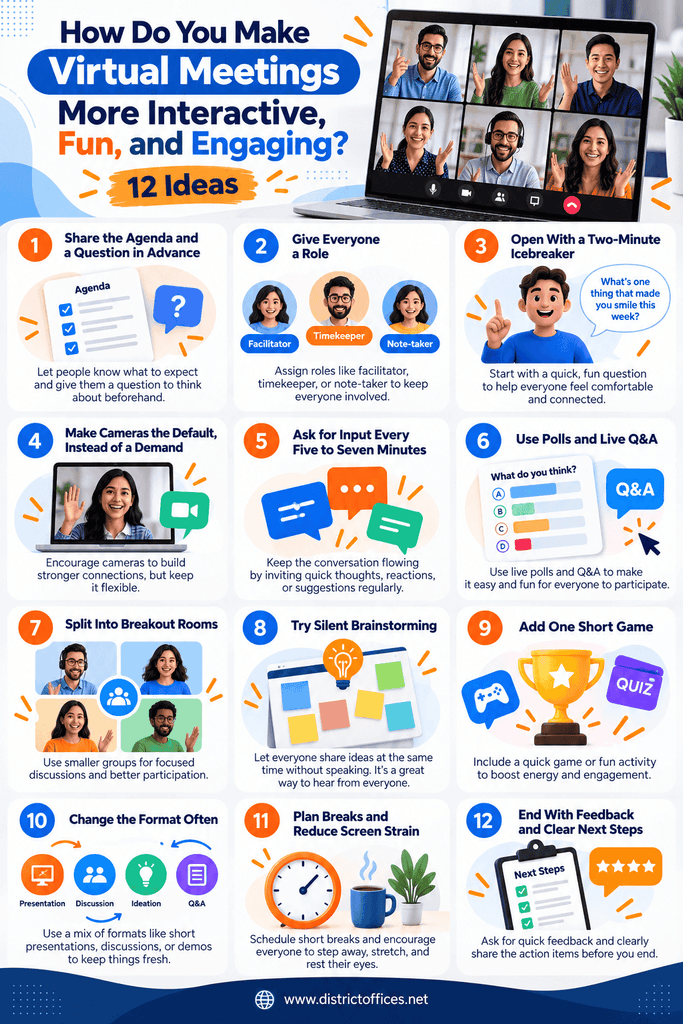
You do not need all 12 in every meeting. Instead, pick three or four ideas, such as virtual meeting icebreakers or polls, that fit your group and your topic. Then add more as your team gets comfortable.
1. Share the Agenda and a Question in advance.
Send the agenda at least a day early, with one question people should think about. For a short checklist, read how to set up your meetings for success. This gives quieter team members time to prepare, so they speak up with more confidence. It also explains why everyone is invited, which boosts engagement from the first minute.
2. Give Everyone a Role
Assign a facilitator, timekeeper, note-taker, and chat monitor before the call starts. Roles turn observers into participants, the heart of HBR’s advice, and make virtual meetings more interactive at almost no cost. Also rotate them each week so no one carries the load alone, and everyone learns how the meeting runs.
3. Open With a Two-Minute Icebreaker
Virtual meeting icebreakers help people warm up and feel safe speaking. Keep them short and light. For example, ask “What is one thing on your desk right now?” or “Rate your week from one to five.” For a new group, add names and roles first. Then pause the small talk after two minutes and move to the agenda. These virtual meeting icebreakers cost little and set a friendly tone.
4. Make Cameras the Default, Instead of a Demand
HBR advises that camera use should be a rare opt-out, because being seen makes people more likely to participate. However, allow audio-only for bandwidth or fatigue, and say so openly. This protects both engagement and trust, and it respects Bailenson’s point about camera strain.
5. Ask for Input Every Five to Seven Minutes
Long stretches of listening invite multitasking. HBR suggests building two or three short engagement moments into a 15-minute presentation. That works out to roughly one every five to seven minutes. A quick question in the chat, a raised hand, or a one-word answer is also enough. Short virtual meeting activities like these keep virtual meeting engagement steady.
6. Use Polls and Live Q&A
Polls are the fastest way to make virtual meetings more interactive, because they give everyone a voice at once. Use them to check opinions, test understanding, or choose between options. Live Q&A also lets people ask questions without interrupting. If some attendees dial in without a screen, send polls ahead of time, as Get There Oregon advises.
7. Split Into Breakout Rooms
Breakout rooms work because small groups feel safer than a full room, which lifts virtual meeting engagement. Get There Oregon suggests groups of two to four people for discussion and five to eight for brainstorming. Give each room one specific task and a group leader or facilitator. Also ask people to introduce themselves when they enter, so those without video know who is in the room.
8. Try Silent Brainstorming
Open a shared document or whiteboard and let everyone write ideas at the same time. HBR recommends this method to engage larger groups without speaker logjams, and to lower the fear of judgment, which also helps virtual meeting engagement. Give people 10 to 20 minutes, then read the best ideas aloud. A virtual whiteboard makes this easy.
9. Add One Short Game
Light virtual meeting activities can lift energy when attention dips, and a short game can make virtual meetings more fun. For example, try a two-minute trivia round, a “guess the photo” game, or a quick scavenger hunt. Keep games tied to the meeting when you can, such as a quiz on last week’s project. However, skip games when the topic is sensitive.
10. Change the Format Often
Monotony invites multitasking, and variety protects virtual meeting engagement. Forbes contributor William Arruda recommends pattern interrupts, such as switching from slides to a poll, a whiteboard, or a short video. In practice, change the activity at least every 10 minutes: talk, then poll, then discuss, then write. These virtual meeting ideas also make virtual meetings more engaging.
11. Plan Breaks and Reduce Screen Strain
Back-to-back calls drain everyone, so end meetings five minutes early. Bailenson’s tips also help here: hide self-view, avoid full-screen mode, and offer an audio-only option so people can stand or walk. These steps reduce Zoom fatigue. As a result, the second half of the meeting is as strong as the first, and virtual meeting engagement lasts.
12. End With Feedback and Clear Next Steps
Close every meeting with two quick questions, such as “Was the agenda clear?” and “How could we improve the pacing?” Atlassian recommends this kind of feedback step to improve future meetings. Then confirm owners and deadlines in writing, so it is easier to make virtual meetings more engaging next time. People engage more when they know their input leads to action, so this step also supports long-term virtual meeting engagement.
Which Virtual Meeting Activities Fit Each Type of Meeting?
The best virtual meeting ideas depend on the goal of the meeting, and the right virtual meeting activities make virtual meetings more engaging. A stand-up needs speed, while a brainstorm needs space to think. Choosing the right format also saves time.
Use the table below as a starting point, then adjust to your team’s size and culture. If an activity feels forced, drop it. Instead, remember that interaction should help people do the work, not distract them from it. These formats make interactive virtual meetings easier to plan.
| Meeting type | Best interactive move | Time needed |
| Team stand-up | One-word check-in, then quick round | 2 minutes |
| Brainstorm | Silent brainstorming, then breakout rooms | 15 to 20 minutes |
| Training session | Polls and a short quiz | 5 minutes |
| All-hands | Live Q&A and one poll | 10 minutes |
| One-on-one | Audio-only walk and talk | Full meeting |
| Kick-off | Icebreaker and role assignments | 5 minutes |
How Do You Keep Hybrid Meetings Interactive?
Hybrid meetings are the hardest place to make virtual meetings engaging because remote attendees can feel invisible next to people in the room. Forbes contributor William Arruda advises prioritizing the virtual experience, since remote participants have a weaker experience and are more likely to multitask. Therefore, treat the remote attendees as your main audience, and choose virtual meeting activities that work for both the room and the call.
Equal access matters too. Get There Oregon recommends a facilitator who manages the chat and allows a “raise hand” option for remote participants. It also advises making breakout activities inclusive of both online and in-person attendees. As a result, remote voices carry equal weight in polls and Q&A. The right room helps too, since on-demand meeting rooms can support hybrid and remote teams. Teams that meet in person on some days can also use a hybrid office space.
- Use one tool for everyone: Polls, chat, and whiteboards should work the same for people in the room and at home, because mixed tools create two classes of attendees.
- Speak to the camera: Instead of looking at the room, face the camera when you talk.
- Call on remote voices first: Invite online participants to speak before the room, because they are easiest to overlook.
- Share the screen: Put slides and notes where everyone can see them. Also keep the chat visible.
What Mistakes Make Virtual Meetings Boring?
Most boring meetings share the same few flaws: no clear purpose, too much talking, and no space for people to contribute. Fixing these usually matters more than adding fancy tools, because tools cannot replace structure.
The good news is that each mistake has a simple fix, and each fix will make virtual meetings more engaging. Check your last meeting against the five below, then change the ones that apply:
- Skipping the agenda: Without one, people do not know why they are there. As a result, they multitask.
- Reading slides aloud: If people can read the slides themselves, send them as a pre-read. Then use the call to discuss.
- Letting two people dominate: Instead, use roles, polls, and breakout rooms so quieter voices get a turn, and let the facilitator step in. See also how to handle a team member who dominates meetings.
- Forcing fun: Virtual meeting activities that feel childish or off topic can make people cringe. Instead, keep them short and optional.
- Running long: Fatigue sets in fast, and tired people stop listening. Therefore, cut meetings that could be an update.
Wrapping Up
To make virtual meetings more interactive, plan the interaction, not just the agenda. Give people roles, ask for input every few minutes, and mix formats so attention does not drift. Small habits, like virtual meeting icebreakers and a quick poll, also boost engagement. These simple virtual meeting ideas work in almost any team.
Start with one meeting this week. First, send the agenda and one question in advance, then open with one of the virtual meeting icebreakers above. Next, add a poll and a short breakout. Finally, ask for feedback at the end, and use it to make virtual meetings more interactive over time. If you need a room built for hybrid calls, explore meeting rooms in Washington, DC.
Frequently Asked Questions
Give people something to do every five to seven minutes, such as a poll, a chat question, or a breakout task. Also open with virtual meeting icebreakers, assign a facilitator, share the agenda early, and ask for feedback at the end.
Short, low-pressure questions work best. For example, ask “What is one good thing from your week?” or “Share one object on your desk.” Keep icebreakers to two minutes, then move on to the agenda so the meeting stays focused.
Use formats that lower the risk of speaking, such as chat, polls, silent brainstorming in a shared document, and small breakout rooms. Also tell people in advance which question you will ask them.
As short as the goal allows. Shorter calls reduce fatigue, and ending five minutes early also gives people a break. If a meeting must run long, add polls, breakouts, and a short pause.
Tie the fun to the topic. For example, a quick quiz on last week’s project adds energy and still serves the meeting. These virtual meeting ideas work best when you keep games short and optional.
Most platforms, including Zoom, Microsoft Teams, and Google Meet, include polls, breakout rooms, chat, reactions, whiteboards, and Q&A. Start with the tools you already use. However, add a separate tool only if you need a feature your platform lacks.